As people age, one of the most common daily challenges is reduced hearing ability. Watching television—once a simple source of entertainment—can gradually become frustrating due to unclear dialogue, background noise, or the need to increase volume to uncomfortable levels for others in the household.
Fortunately, modern audio technology offers a practical solution. Wireless headphones for TV listening have become an increasingly popular way to help seniors enjoy clearer, more comfortable audio without disturbing others.
This article explains how wireless headphones can significantly improve TV listening for seniors, the key benefits they offer, and what to consider when choosing the right model.
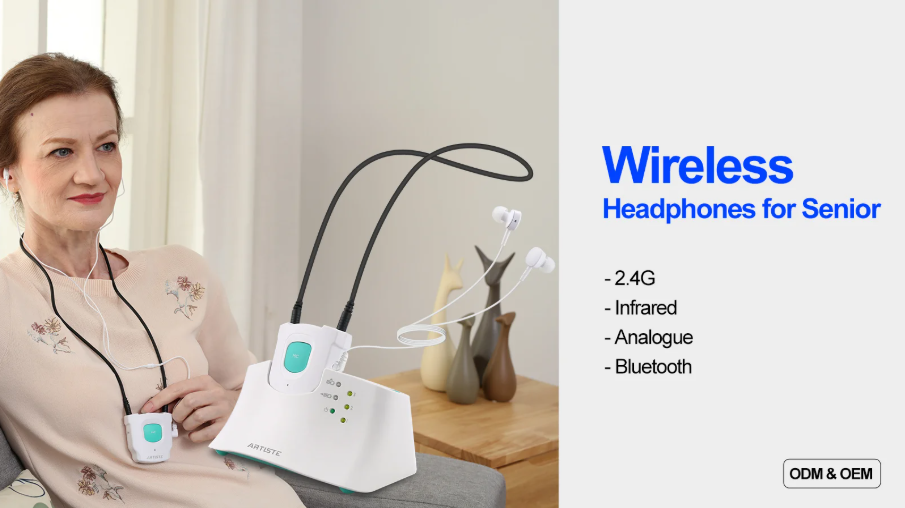
Why TV Listening Becomes Difficult for Seniors
Hearing ability naturally declines with age, a condition known as presbycusis. This often affects:
-
High-frequency sound clarity (especially speech consonants)
-
Ability to separate dialogue from background noise
-
Sensitivity to distortion at higher volumes
-
Comfort during prolonged listening
As a result, TV audio may sound muffled or unclear even at higher volume levels, making it difficult to follow conversations in movies, news, or programs.
How Wireless Headphones Solve the Problem
Wireless headphones provide a direct audio path between the TV and the listener’s ears. Instead of relying on room acoustics, the sound is transmitted wirelessly, reducing interference and improving clarity.
Modern systems typically use:
-
RF (radio frequency) transmitters
-
Bluetooth connections
-
Low-latency digital transmission technology
This ensures that seniors receive clear, synchronized audio without delay or distortion.
Key Benefits of Wireless Headphones for Seniors
1. Improved Speech Clarity
One of the biggest advantages is enhanced dialogue clarity. Wireless headphones help isolate speech frequencies, making conversations easier to understand even in noisy scenes.
2. Independent Volume Control
Seniors can adjust volume levels independently without affecting others in the room. This eliminates common family conflicts over TV loudness.
3. Reduced Background Noise
Wireless headphones minimize ambient room noise, allowing users to focus on the content instead of distractions such as air conditioning, kitchen sounds, or household activity.
4. Comfortable Listening Experience
Many modern models are designed with:
-
Soft ear cushions
-
Lightweight frames
-
Adjustable headbands
This makes them suitable for long viewing sessions without discomfort.
5. Better TV Enjoyment and Social Engagement
When seniors can clearly hear dialogue again, they are more likely to:
-
Watch TV regularly
-
Follow news and entertainment content
-
Engage in conversations with family about programs
This improves both entertainment quality and social connection.
Important Features to Look for in TV Wireless Headphones
When selecting wireless headphones for TV use, consider the following features:
Low Latency Audio
Low latency ensures that sound matches lip movements on screen, preventing audio delay.
Long Wireless Range
A strong signal range (often 10–30 meters) allows freedom of movement within the home.
Easy Charging and Docking
Many systems include a charging base station for simple storage and recharging.
Hearing-Friendly Sound Profiles
Some headphones offer enhanced speech modes or EQ settings specifically designed for hearing assistance.
Simple Controls
Large buttons, intuitive design, and easy pairing are especially important for senior users.
Types of Wireless TV Headphone Systems
RF Wireless Headphones
These use a dedicated transmitter connected to the TV. They are stable, easy to use, and ideal for seniors who prefer simplicity.
Bluetooth TV Headphones
Bluetooth models connect directly to smart TVs or external transmitters. They offer flexibility but may require compatibility checks.
Assisted Listening Headphones
These are specially designed for hearing support, often featuring voice enhancement and noise reduction technologies.
Setup and Usage Tips
To ensure the best experience, follow these tips:
-
Place the transmitter in a clear line-of-sight position
-
Keep headphones charged before use
-
Adjust TV audio settings (disable excessive surround effects if needed)
-
Test volume levels gradually for comfort
-
Ensure pairing is completed before watching
Safety and Comfort Considerations
When using wireless headphones for extended periods, seniors should:
-
Take short breaks to reduce ear fatigue
-
Avoid excessively high volume levels
-
Ensure proper fit to prevent pressure discomfort
-
Keep volume within safe listening ranges
Conclusion
Wireless headphones provide a simple yet highly effective solution for improving TV listening for seniors. By enhancing dialogue clarity, reducing background noise, and allowing independent volume control, they restore the enjoyment of television without disrupting others in the home.
As audio technology continues to improve, wireless headphones are becoming an essential accessibility tool—helping seniors stay connected, entertained, and engaged with the world around them.
www.arkon.com.hk
ARKON